
Fuel receipts, organized not a shoebox full.
Snap a photo and you're done: FuelFile reads the total, gallons and price per gallon, double-checks the math and exports clean CSV and PDF reports for your taxes or bookkeeping. No more lost receipts.
Free download – no account, no sign-up.
Receipts everywhere. But where were the numbers?
Between your glovebox, your wallet, and fading paper receipts, it's easy to lose track of what fuel actually costs you. FuelFile fixes that.
The Problem
- Fuel receipts fade or get lost before you log them
- Hours of sorting and typing receipts at year-end
- No clear separation between multiple vehicles
- No idea what fuel actually cost you this year
The Solution
- Automatic Capture - Photograph a receipt — total, gallons (or liters) and price are read automatically
- Self-Correction - Gallons × price is automatically cross-checked against the total and corrected
- Multiple Vehicles - Car, motorbike, EV — all kept cleanly separate
- CSV & PDF Export - Export to Excel, Numbers or Google Sheets — with your receipt photos — or as a clean PDF report
Is it worth it for you?
An honest calculation – and when you don't need the app for taxes at all.
Example: business vehicle, two fill-ups a month at $60
- Gas per year
- $1,440
- Lose one receipt in ten
- $144 in missed deductions
- At a 25% tax rate
- about $36 more tax
- FuelFile Pro, yearly plan
- about $12.99
Example only, not tax advice. Applies if you deduct actual vehicle expenses instead of the standard mileage rate.
Actual vehicle expenses
Every gas receipt is a deductible expense. FuelFile captures it with a photo and gives you clean CSV and PDF reports for your bookkeeping.
Standard mileage rate
You don't need gas receipts for your taxes then. FuelFile still shows what your car really costs and its real MPG.
Personal driving
Gas spending and MPG at a glance, no account, no cloud. Multiple vehicles with Pro.
Everything you need
Built for anyone who wants their fuel costs under control — without the paperwork.
Capture a receipt in seconds
Snap a photo, done. On-device OCR reads the total, gallons and price per gallon automatically — US receipts and liter-based receipts alike.
Self-correcting values
The app cross-checks total, gallons and price per gallon automatically and suggests corrections.
CSV & PDF export
CSV for Excel, Numbers or Google Sheets — with your receipt photos — plus a clean PDF report. DATEV-CSV for German accountants is included too.
Multiple vehicles
Car, motorbike, or EV — manage as many vehicles as you need, each fuel type tracked separately.
MPG & cost stats
Fuel economy in MPG (US), MPG (UK) or L/100 km, cost per mile and average price per gallon for every vehicle.
100% offline & private
All your data stays on your device. No account, no cloud, no tracking.
Everything at a glance
A clean design that leaves nothing to be desired
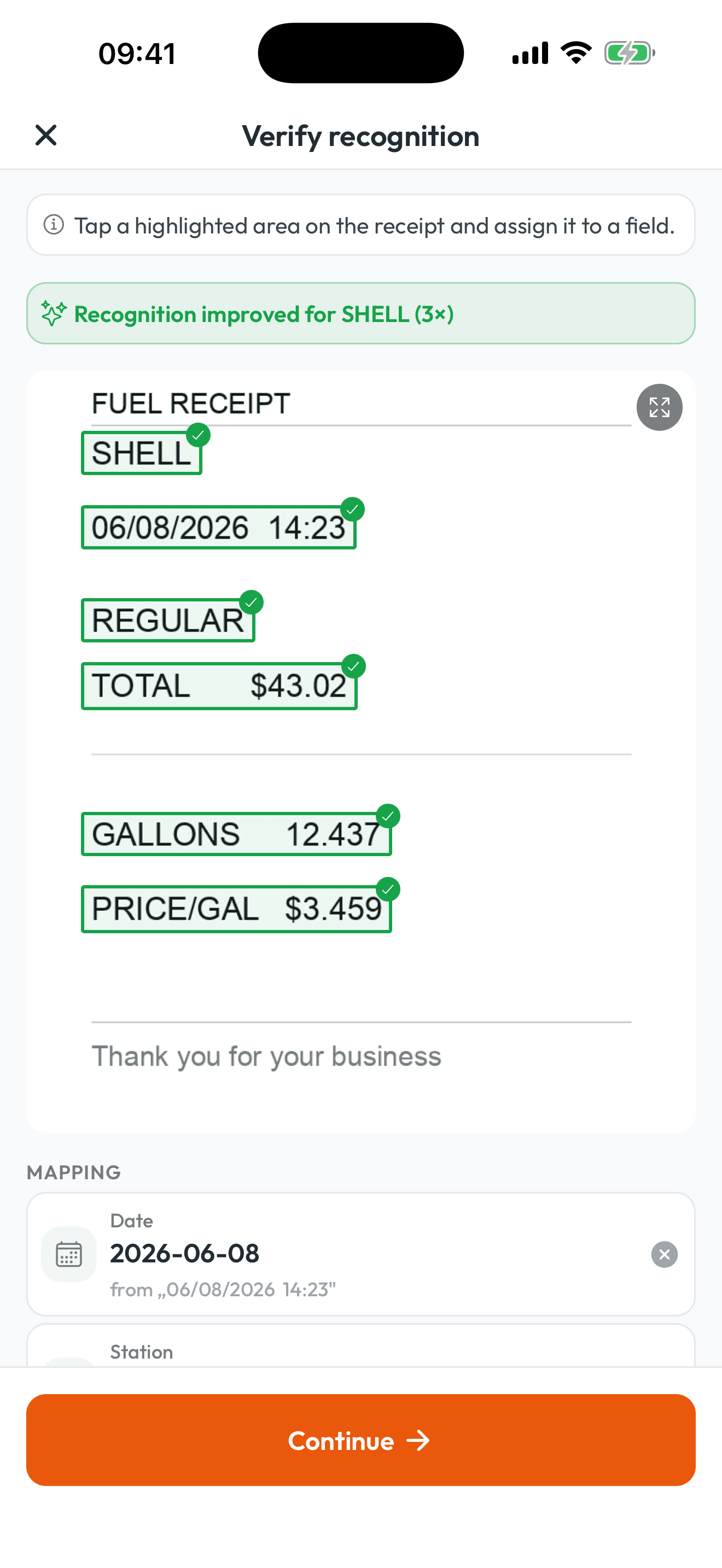
Check & correct
Tap detected values to confirm or correct them in seconds
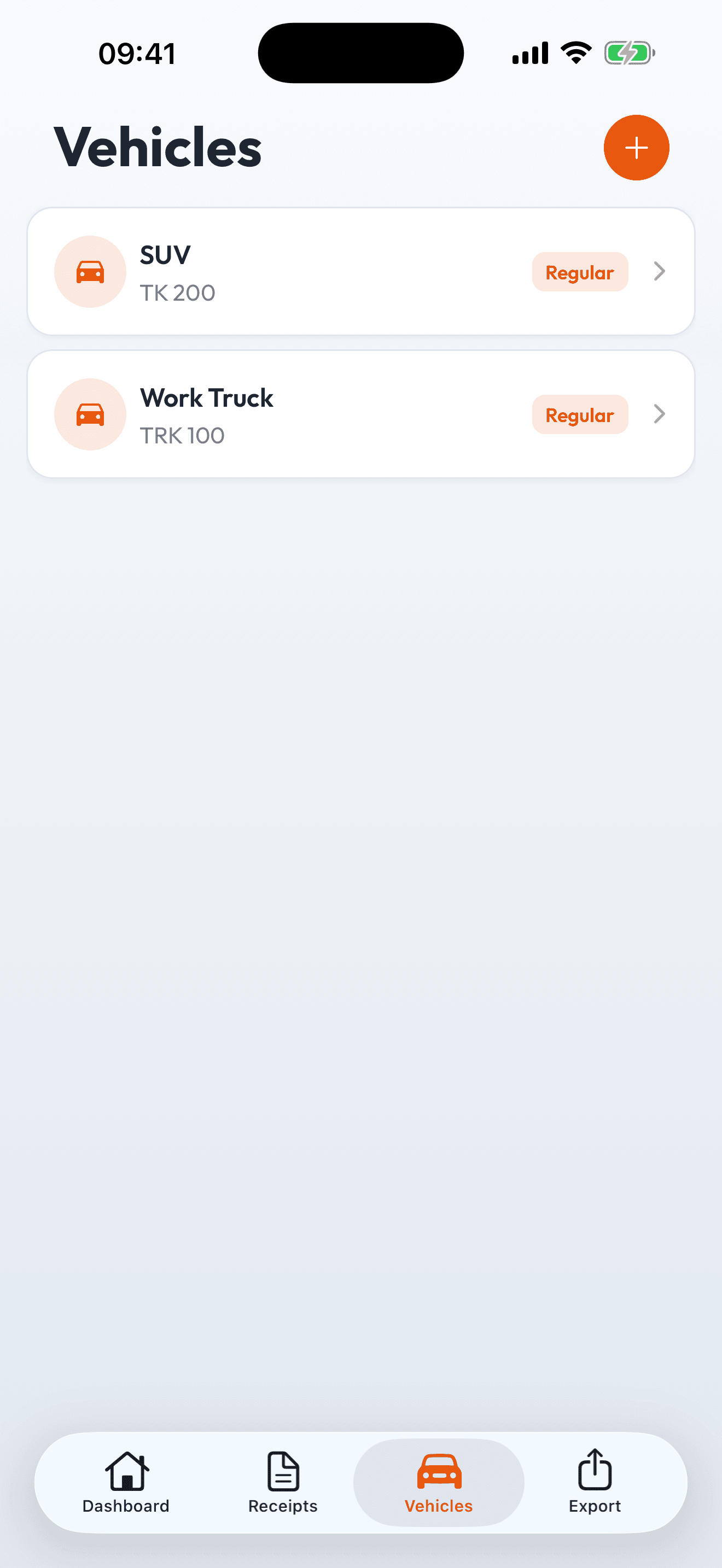
Every vehicle, separated
Car, motorbike, EV — each vehicle with its own cost overview
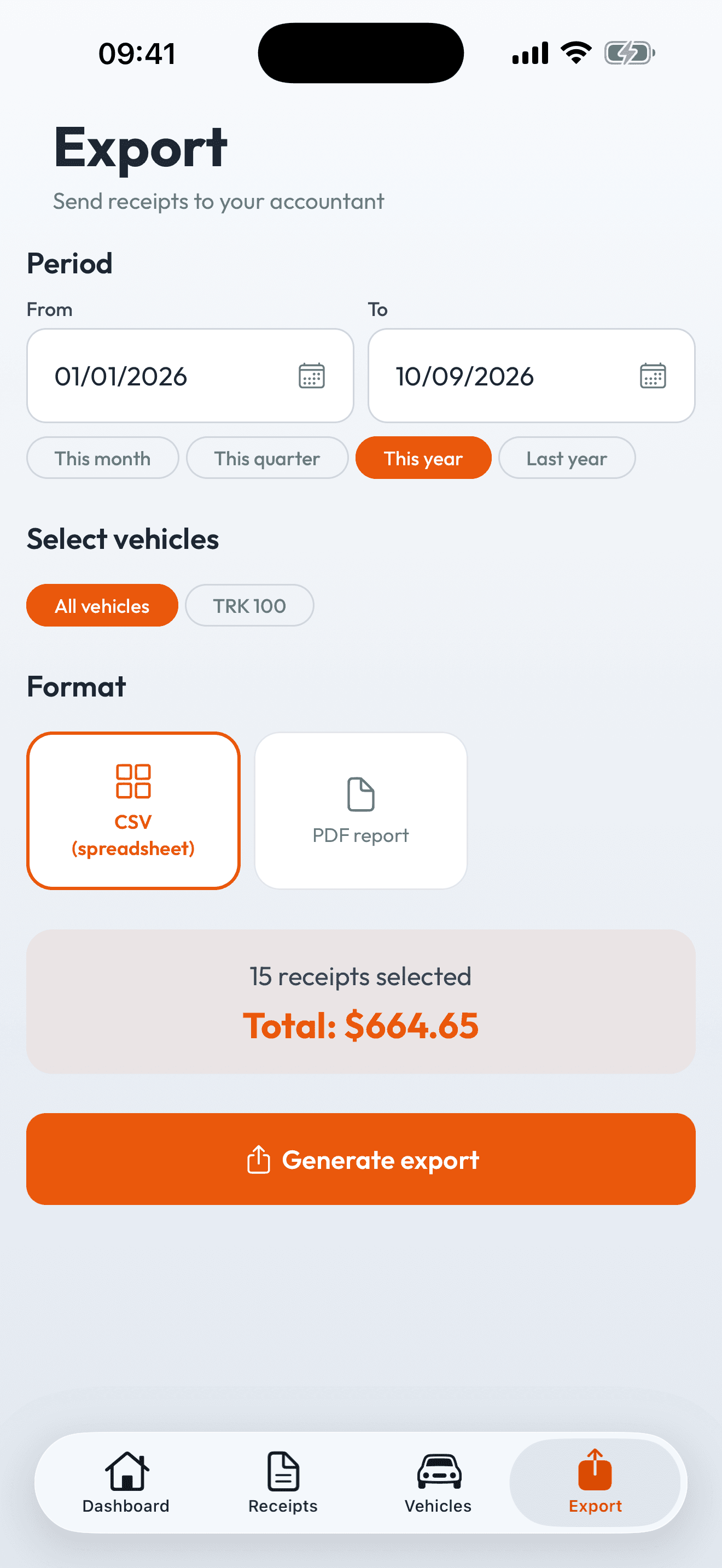
Export in seconds
CSV or PDF report — filtered by date range and vehicle
How it works
Three steps to a full overview of your fuel costs
Photograph a receipt
Snap a photo of your fuel receipt or import one from your photo library.
Check the values
OCR detects the total, gallons and price — a quick tap to confirm.
Export to CSV or PDF
CSV for any spreadsheet or a PDF report — filtered by date range and vehicle.
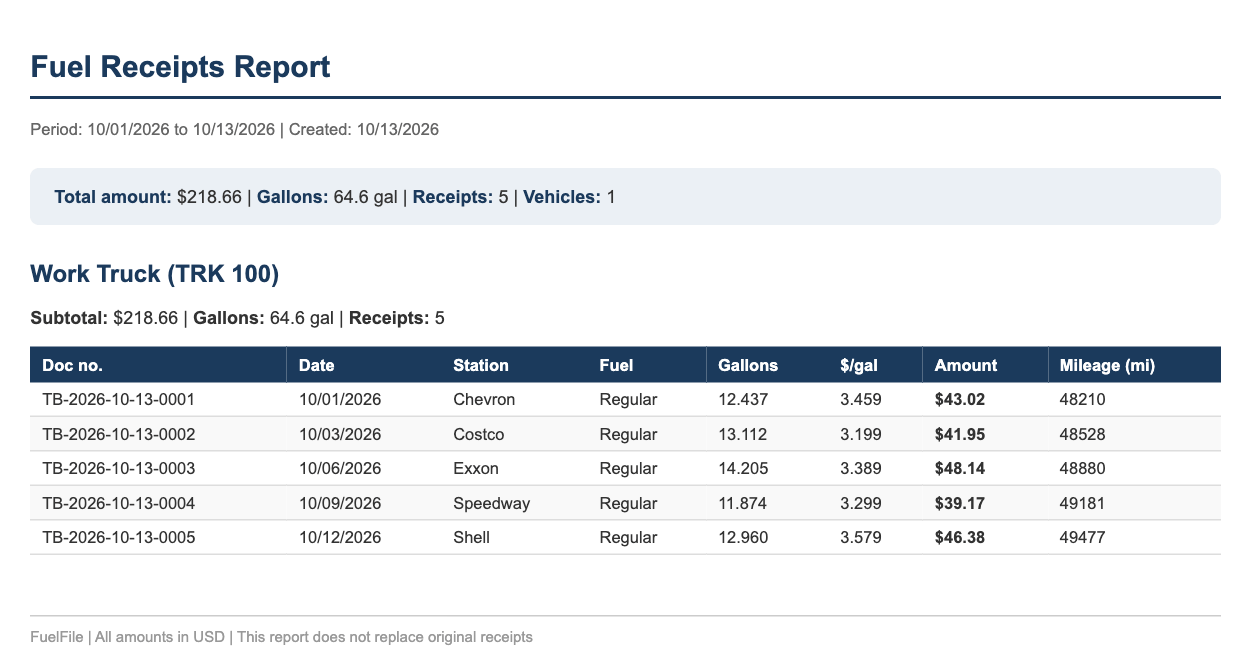
What you hand to your accountant
No retyping, no follow-up questions: a PDF report for your records and a CSV that drops straight into your spreadsheet or bookkeeping software.
Date,Vehicle,License plate,Station,Fuel type,Gallons,Price/gal (USD),Amount (USD),Mileage (mi),Doc no.
2026-10-01,Work Truck,TRK 100,Chevron,Regular,12.437,3.459,43.02,48210,TB-2026-10-13-0001
2026-10-03,Work Truck,TRK 100,Costco,Regular,13.112,3.199,41.95,48528,TB-2026-10-13-0002
2026-10-06,Work Truck,TRK 100,Exxon,Regular,14.205,3.389,48.14,48880,TB-2026-10-13-0003
Gallons, price per gallon and miles, ISO dates. Opens in Excel, Numbers or Google Sheets; the doc no. matches the receipt photo’s file name in the export.
Filter by date range and vehicle. CSV and PDF export are part of Pro.
Fuel expenses, ready for your books
For self-employed drivers, small businesses and anyone filing expense reports, FuelFile turns your gas receipts into a clean, exportable record.
CSV for any spreadsheet
Export to CSV for Excel, Numbers or Google Sheets — with your receipt photos. DATEV-CSV for German accountants is available too.
PDF report
A clean PDF report for your own records or your expense report.
Filter by date range & vehicle
Export exactly the period and vehicles you need, nothing more.
Shoebox, bookkeeping software or FuelFile?
An honest comparison — for fuel receipts, not your whole bookkeeping.
Capturing a receipt
FuelFilephoto, gallons & price per gallon checked automatically
- Shoebox & spreadsheet
- type it in
- Bookkeeping software
- photo, generic
Account & cloud
FuelFilenot needed, fully offline
- Shoebox & spreadsheet
- –
- Bookkeeping software
- usually required
MPG & cost per vehicle
FuelFileautomatic
- Shoebox & spreadsheet
- do the math yourself
- Bookkeeping software
- usually not
Export for your accountant
FuelFileCSV, PDF
- Shoebox & spreadsheet
- put it together yourself
- Bookkeeping software
- yes
Cost
FuelFileFree or about $1.08/month on the yearly plan
- Shoebox & spreadsheet
- free, but costs time
- Bookkeeping software
- usually a monthly plan for the whole business
| Comparison | Shoebox & spreadsheet | Bookkeeping software | FuelFile |
|---|---|---|---|
| Capturing a receipt | type it in | photo, generic | photo, gallons & price per gallon checked automatically |
| Account & cloud | – | usually required | not needed, fully offline |
| MPG & cost per vehicle | do the math yourself | usually not | automatic |
| Export for your accountant | put it together yourself | yes | CSV, PDF |
| Cost | free, but costs time | usually a monthly plan for the whole business | Free or about $1.08/month on the yearly plan |
Already using bookkeeping software? FuelFile feeds it clean fuel records.
Full transparency — pricing included
Start for free and switch to Pro whenever you need more.
7-day free trial
On the yearly plan — try every Pro feature, no strings attached
Free
To try it out
- 1 vehicle
- 10 OCR scans in month 1, then 3 per month
- Unlimited manual entries
- Local backup & restore
Pro
or ~$12.99/year — for frequent drivers & the self-employed
- Unlimited vehicles
- Unlimited OCR scans & receipts
- All exports: CSV & PDF (plus DATEV-CSV)
- Advanced statistics
- 7-day free trial on yearly
- Cancel anytime
A note on pricing
FuelFile runs fully offline, with no ads and no tracking. Pro subscriptions let me keep developing the app and running support.
Prices are approximate and may vary by store and region. The yearly plan includes a 7-day free trial, after which it renews automatically. Subscriptions can be cancelled anytime via the App Store or Google Play.
Frequently asked questions
- Will the app read my gas receipts?
- Usually, yes. Text recognition runs right on your phone and knows receipts from the big chains such as Shell, Chevron, Exxon, Mobil, BP, Costco, Speedway and Circle K. It reads the total, gallons and price per gallon and checks that gallons × price per gallon matches the total. For each station FuelFile remembers where the values sit on the receipt, so it gets more accurate with every scan. Before saving, you review everything and can tap any value to correct it. For unusual layouts, assign the fields by tapping or type them in.
- What happens if my phone breaks?
- Your data lives only on your device, which is why there is a local backup, also in the free version. Settings → “Create backup” produces a file with all vehicles, receipts and receipt photos that you can store wherever you like: iCloud Drive, Google Drive or your computer. On your new phone, install FuelFile and load the file via “Restore backup”. Since there is no cloud copy, make a backup regularly.
- Is FuelFile useful if I’m an employee?
- For taxes you generally don’t need your fuel receipts: W-2 employees generally can’t deduct commuting or car costs on their federal return. FuelFile still shows what your car really costs and how many MPG you get, and the free version is usually enough for that. This is not tax advice; if in doubt, ask a tax professional.
- Is FuelFile useful if I’m self-employed in Canada (CRA)?
- Yes. In Canada, self-employed people deduct their actual vehicle expenses (fuel, insurance, maintenance and so on) on Form T2125, not a per-kilometre rate; that rate is the tax-free allowance employers pay their employees. Your receipts are the proof the CRA expects, and FuelFile keeps every fuel receipt organized and exportable as CSV. This is not tax advice; if in doubt, ask a tax professional.
- Is the app really fully offline?
- Yes, completely. FuelFile stores all data — vehicles, receipts, receipt photos, and the text read during recognition — exclusively in a local database on your device. Text recognition (OCR) runs entirely on-device via Google ML Kit; neither receipt photos nor the recognized text are ever sent to a server. There is no user account, no cloud sync, no analytics or tracking services, and no advertising SDKs. An internet connection is only needed for the optional Pro purchase and for restoring purchases — and even then only RevenueCat handles the payment, receiving just an anonymous user ID and the purchase receipt, no personal data. You can export all your data as a JSON file or delete it completely at any time; since no servers are involved, deletion is immediate and permanent. Uninstalling the app removes all locally stored data.
- Does FuelFile work with US gas receipts and MPG?
- Yes. Since version 1.1.0 you can choose your units in Settings: gallons, miles and MPG (US), liters, miles and MPG (UK), or metric (liters and L/100 km). US gas receipts are read correctly — gallons, price per gallon ($/gal), MM/DD dates and the major US gas station brands. FuelFile shows your fuel economy, cost per mile and average price per gallon for every vehicle, and exports everything to CSV for Excel, Numbers or Google Sheets — with your receipt photos — or as a clean PDF report. A DATEV-CSV export for German accountants is still included.
- Does FuelFile work with EVs or motorbikes?
- Yes. You can add as many vehicles as you like — car, motorbike, or EV — and track every common fuel type, including electricity.
- What does FuelFile cost — Free vs. Pro?
- Free is free forever: 1 vehicle, 10 OCR scans in the first month (then 3 per month), unlimited manual entries, and local backup. Pro costs about $1.99/month or about $12.99/year in the US (prices vary slightly by store and country) and unlocks unlimited OCR scans, unlimited vehicles, and every export (CSV, PDF, DATEV-CSV).
- Do my receipt photos really stay only on my device?
- Yes. Receipt photos, recognized text, and all vehicle data live exclusively in a local database on your device. There's no cloud sync and no user account.
- What happens after the 7-day trial?
- The free trial applies to the yearly plan. Unless cancelled at least 24 hours before it ends, it renews automatically at full price. You can cancel anytime via the App Store or Google Play.
- Why is the app called TankKosten in some countries instead of FuelFile?
- TankKosten and FuelFile are the same app with the same features — only the name adapts to the language: TankKosten for German-speaking users, FuelFile everywhere else.
- Can I cancel anytime?
- Yes. Subscriptions can be cancelled anytime through your App Store or Google Play subscription management. There are no cancellation periods or fees.
- Which devices is the app available for?
- FuelFile is available for Android (since September 2026) and iPhone (since October 2026) — on Google Play and the App Store.
Usually, yes. Text recognition runs right on your phone and knows receipts from the big chains such as Shell, Chevron, Exxon, Mobil, BP, Costco, Speedway and Circle K. It reads the total, gallons and price per gallon and checks that gallons × price per gallon matches the total. For each station FuelFile remembers where the values sit on the receipt, so it gets more accurate with every scan. Before saving, you review everything and can tap any value to correct it. For unusual layouts, assign the fields by tapping or type them in.
Built by an independent developer
FuelFile is built by Patrick Jerominek, developer and founder of BeeBack UG in Frankfurt am Main. The app grew out of a simple goal: to replace the glovebox full of fuel receipts with a clean, exportable overview — no cloud, no account, no tracking.
Legal notice & provider →Gas receipts, organized — not a shoebox full
Get FuelFile for iPhone and Android — or leave your email to hear about new features.